
SPFx subscription integration
Connect your SPFx web part to the Chronodat Subscription API for tenant trial checks, Stripe checkout, and billing portal — all from the browser on SharePoint pages.
Architecture
The Chronodat Subscription API is a Vercel serverless layer that sits between your clients (SPFx web parts, the subscription portal, and the admin dashboard) and the services that hold state — Supabase, Stripe, Resend, and Microsoft Entra ID.
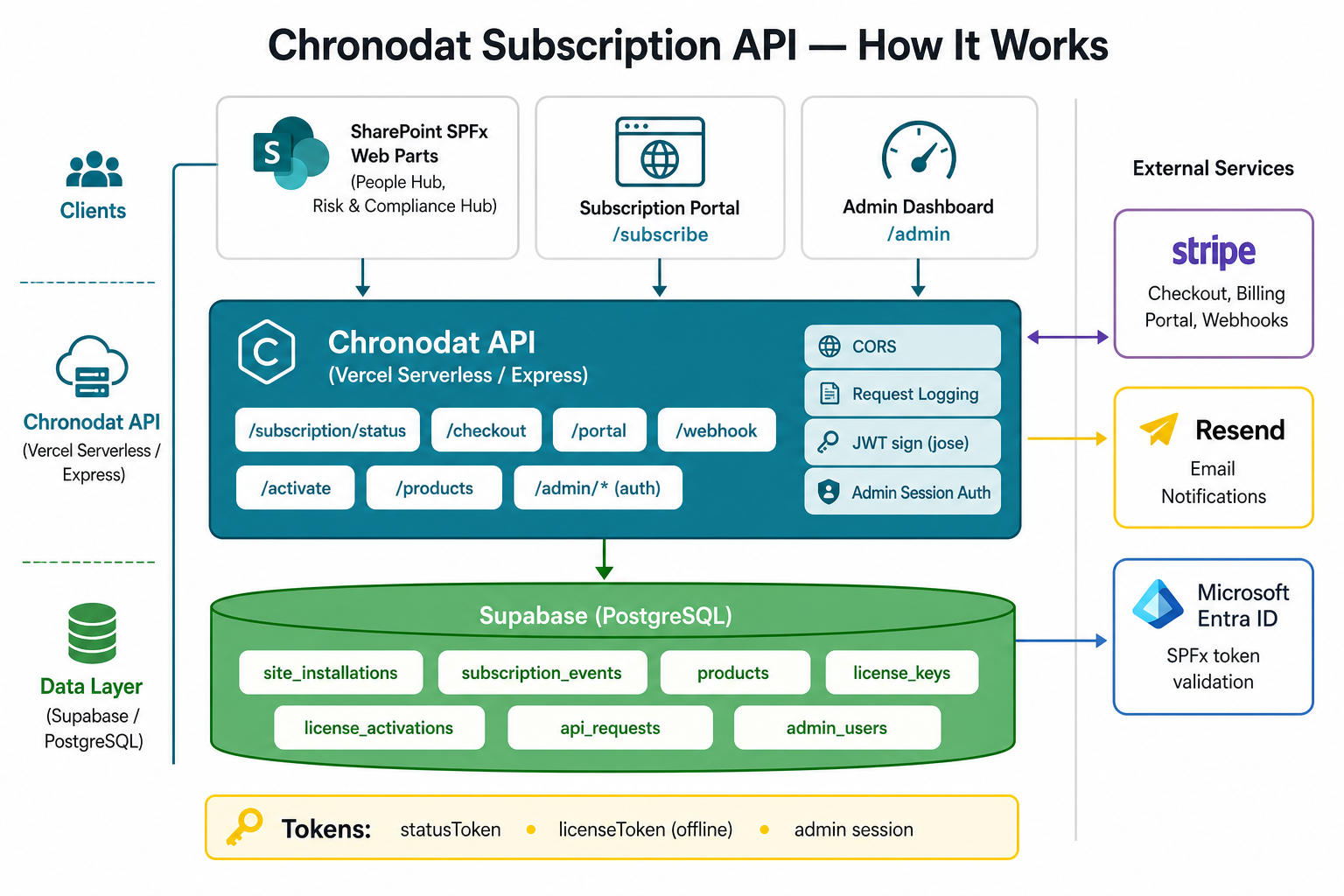
Request flow
-
Access check. An SPFx web part calls
GET /api/subscription/status. The API validates the caller's Entra (AAD) token, looks up the site inspfx_site_installations, and returnstrialing/active/expiredplus a signedstatusToken. -
Subscribe. From
/subscribe(or the web part),POST /api/subscription/checkoutresolves the product's Stripe price from thespfx_productstable and returns a Stripe Checkout URL. -
Stripe webhooks. Stripe calls
POST /api/subscription/webhook; the API updates the site record, logs a row inspfx_subscription_events, and triggers a Resend email. -
Offline licensing.
POST /api/subscription/activatevalidates a key fromspfx_license_keys, records the activation, and issues a long-livedlicenseToken(RS256 JWT) the client verifies offline against the public signing key. -
Admin.
/admin/*pages authenticate viaPOST /api/admin/loginagainstspfx_admin_usersand use a signed session token to manage products, sites, and license keys. -
Observability. Every request is logged to
spfx_api_requestsand surfaced on the Subscriptions → API requests page.
How it works
Billing is per SharePoint site. Your web part calls this API; Stripe secrets never go in SPFx code.
Set this as Subscription API URL in your web part (no trailing slash).
1. Configure CORS
Set APP_ORIGIN on Vercel so SharePoint origins can call the API from the browser.
| Scenario | APP_ORIGIN |
|---|---|
| All SharePoint Online customers (recommended) | sharepoint-online |
| Specific tenants | https://contoso.sharepoint.com,https://fabrikam.sharepoint.com |
| SPFx workbench + production | sharepoint-online,https://localhost:4322 |
2. Web part property pane
| Property | Type | Description |
|---|---|---|
| Subscription API URL | string | Your API base URL — no trailing slash |
| Skip subscription check | boolean | true for dev only; false in production |
3. Get tenant context from SPFx
Use the Azure AD tenant ID on every API call. The first status request starts the 14-day trial.
import { WebPartContext } from '@microsoft/sp-webpart-base';

export function getTenantId(context: WebPartContext): string {
  return context.pageContext.aadInfo?.tenantId?.toString() ?? '';
}

export function getUserEmail(context: WebPartContext): string {
  return context.pageContext.user.email;
}

export function getSiteUrl(context: WebPartContext): string {
  return context.pageContext.web.absoluteUrl;
}
4. Subscription service
Add src/services/SubscriptionService.ts to your SPFx project:
export interface SubscriptionStatus {
  status: 'trialing' | 'active' | 'past_due' | 'expired';
  hasAccess: boolean;
  trialDaysTotal: number;
  trialDaysRemaining: number;
  trialEndsAt?: string;
  currentPeriodEnd?: string;
  customerEmail?: string;
}

export class SubscriptionService {
  constructor(private readonly apiBaseUrl: string) {
    this.apiBaseUrl = apiBaseUrl.replace(/\/+$/, '');
  }

  async getStatus(params: {
    tenantId: string;
    userEmail?: string;
    siteUrl?: string;
  }): Promise<SubscriptionStatus> {
    const qs = new URLSearchParams({ tenantId: params.tenantId });
    if (params.userEmail) qs.set('userEmail', params.userEmail);
    if (params.siteUrl) qs.set('siteUrl', params.siteUrl);

    const res = await fetch(`${this.apiBaseUrl}/api/subscription/status?${qs}`);
    if (!res.ok) {
      const body = await res.json().catch(() => ({}));
      throw new Error(body.error ?? `Status failed (${res.status})`);
    }
    return res.json();
  }

  async startCheckout(params: {
    tenantId: string;
    userEmail: string;
    successUrl: string;
    cancelUrl: string;
    siteUrl?: string;
    tenantName?: string;
  }): Promise<string> {
    const res = await fetch(`${this.apiBaseUrl}/api/subscription/checkout`, {
      method: 'POST',
      headers: { 'Content-Type': 'application/json' },
      body: JSON.stringify(params)
    });
    if (!res.ok) throw new Error((await res.json().catch(() => ({}))).error ?? 'Checkout failed');
    return (await res.json()).url;
  }

  async openBillingPortal(params: { tenantId: string; returnUrl: string }): Promise<string> {
    const res = await fetch(`${this.apiBaseUrl}/api/subscription/portal`, {
      method: 'POST',
      headers: { 'Content-Type': 'application/json' },
      body: JSON.stringify(params)
    });
    if (!res.ok) throw new Error((await res.json().catch(() => ({}))).error ?? 'Portal failed');
    return (await res.json()).url;
  }
}
5. Offline license keys (one key = one site)
Admins generate keys at /admin/license-keys.
Each key activates one SharePoint site and returns a long-lived licenseToken JWT for offline access.
const res = await fetch(`${apiBaseUrl}/api/subscription/activate`, {
  method: 'POST',
  headers: { 'Content-Type': 'application/json', Accept: 'application/json' },
  body: JSON.stringify({
    licenseKey: 'CDAT-DEFA-A1B2-C3D4-E5F6',
    tenantId: getTenantId(context),
    siteUrl: getSiteUrl(context),
    siteId: context.pageContext.site.id?.toString(),
    productSlug: 'default'
  })
});
const status = await res.json();
// status.licenseToken → cache in localStorage for offline verification
Copy the reference client from docs/spfx/OfflineLicenseService.ts in this repository.
Install jose in your SPFx project for JWT signature verification.
Access check order
- Verify cached
licenseTokenoffline (signature + expiry) - If unavailable, call
GET /api/subscription/statusonline - If no access, show license key form or Stripe subscribe
6. Check access on web part load
const apiUrl = this.properties.subscriptionApiUrl?.trim();
if (this.properties.skipSubscriptionCheck || !apiUrl) return; // dev bypass

const service = new SubscriptionService(apiUrl);
const status = await service.getStatus({
  tenantId: getTenantId(this.context),
  userEmail: getUserEmail(this.context),
  siteUrl: getSiteUrl(this.context)
});

if (!status.hasAccess) {
  // Show paywall — trial expired
  return;
}

// trialing, active, or past_due — render web part
Status → UI mapping
| status | hasAccess | UI |
|---|---|---|
trialing | true | Full access + trial banner + Subscribe |
active | true | Full access; optional Manage billing |
past_due | true | Warning to update payment |
expired | false | Block features; Subscribe only |
7. Subscribe & manage billing
const pageUrl = window.location.href.split('?')[0];

const url = await service.startCheckout({
  tenantId: getTenantId(this.context),
  userEmail: getUserEmail(this.context),
  successUrl: pageUrl,
  cancelUrl: pageUrl,
  siteUrl: getSiteUrl(this.context)
});
window.location.href = url;
Or link users to the hosted portal for testing:
API reference
| Method | Path | Body / query |
|---|---|---|
| GET | /api/subscription/status | ?tenantId=&siteUrl=&siteId?&productSlug? |
| POST | /api/subscription/activate | licenseKey, tenantId, siteUrl, siteId?, productSlug? |
| GET | /api/subscription/status-signing-key | Public key for JWT verification |
| POST | /api/subscription/checkout | tenantId, siteUrl, userEmail, successUrl, cancelUrl |
| POST | /api/subscription/portal | tenantId, siteUrl, returnUrl |
| POST | /api/notifications/send | tenantId, to[], subject, html — requires active trial/subscription; set RESEND_API_KEY + verified RESEND_FROM on Vercel |
Status response example
{
  "status": "trialing",
  "hasAccess": true,
  "trialDaysTotal": 14,
  "trialDaysRemaining": 12,
  "trialEndsAt": "2026-06-28T10:00:00.000Z",
  "customerEmail": "user@contoso.com"
}
Production checklist
- API deployed with Supabase + Stripe env vars
- Optional:
RESEND_API_KEY+ verifiedRESEND_FROMfor SPFx email notifications APP_ORIGIN=sharepoint-onlineon Vercel- Stripe webhook →
/api/subscription/webhook - Web part Subscription API URL set (no trailing slash)
- Skip subscription check = off in production
- Test: new tenant → trialing → checkout → active
- License keys: generate at
/admin/license-keys→ activate via SPFx or/subscribe - Optional JWT keys for
statusToken/licenseTokenoffline verification